How to Use Proton Sentinel to Keep Your Accounts Safe

If you want the highest possible level of protection, this is it.
https://www.wired.com/story/how-to-use-proton-sentinel/
How to Use Proton Sentinel to Keep Your Accounts Safe
If you want the highest possible level of protection, this is it.
https://www.wired.com/story/how-to-use-proton-sentinel/
How to ask Facebook's Meta to not train its AI models on some of your personal info

Meta, the company behind Facebook and Instagram, now allows users to request that their personal data not be used to train its AI models. These models learn from a variety of sources, including publicly available online data. Users can fill out an objection form to have third-party-sourced personal information removed, inspected, or edited if they wish. However, this policy doesn't apply to personal data shared directly on Meta's social media platforms. Meta employs generative AI models for text, images, code, and music, and these models play a key role in Mark Zuckerberg's vision of the metaverse. They are also used for advertising, chatbots, and customizable stickers on Facebook, Instagram, and Whatsapp.
https://www.theregister.com/2023/08/31/meta_personal_data/
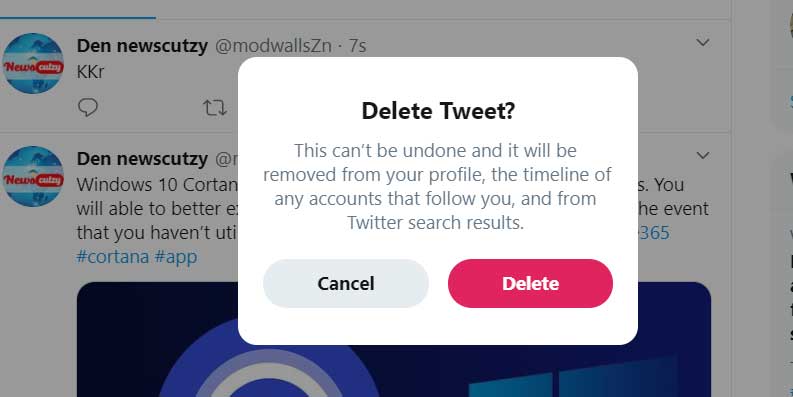
How to Scrub Your Twitter/X Profile
**Step One: Archive Your Tweets**
Before you proceed with deleting your Twitter history, it's recommended to archive your tweets. This archive will help you keep a record of your tweets before you remove them. To access your archive:
1. Go to your Twitter account.
2. Click on "More" in the left-hand column.
3. Navigate to "Settings and Support," then "Settings and Privacy."
4. Under "Your Account," click on "Download an archive of your data."
5. Twitter will send you an email with a ZIP file containing your archive.
**Step Two: Delete Single Tweets**
If you want to remove a few individual tweets, you can delete them one at a time:
1. Go to your Profile page.
2. Locate the tweet you want to delete.
3. Click on the three dots to the right of the tweet.
4. Choose "Delete."
5. Confirm the deletion.
**Step Three: Choose a Service to Manage Your Tweets**
There are various services available to help manage and delete your Twitter history. Some popular options mentioned in the article are TweetDelete, TweetEraser, TweetDeleter, and Redact. These services often use your Twitter archive to identify and delete tweets that are older than the 3,200 tweet limit set by Twitter's API. They might offer free or subscription-based plans with varying levels of deletion capabilities.
It's worth noting that while these services can assist in deleting past tweets, it's still a good idea to periodically check your profile, as there have been instances of deleted posts reappearing.
Full Article: https://www.theverge.com/23833347/twitter-x-history-delete-how-to
How to Make Your Web Searches Secure and Private https://www.wired.com/story/how-to-make-web-searches-secure-private/


